


What you need: a computer with a headset or a laptop and a stable internet connection
Up to 50% off on all programs
Celebrating 8 years of JustSchool leadership
until 28.02
Suitable for children aged 9-13
Classes last 60 minutes
Introduction to programming with Lua
The perfect course combining creativity and logic
How the Roblox Course Works
The program is designed for 64 lessons
Contains 8 modules, each of which is dedicated to different stages of creating, publishing and further monetizing games in the Roblox Studio environment.
Let's analyze the basic principles of programming
Let's learn the Lua language and understand the structure of the code. We will learn the basic concepts of programming: data and variables, as well as work with loops and functions.
Let's consolidate all theory with practice:
70% of the time in classes is devoted to practical programming skills in Roblox! From the very first class, we create our own projects, bringing our ideas to life.
Let's create our own project portfolio
We’ll create 3 full games with unique stories and mechanics, and edit several gameplay videos following the rules of video blogging.
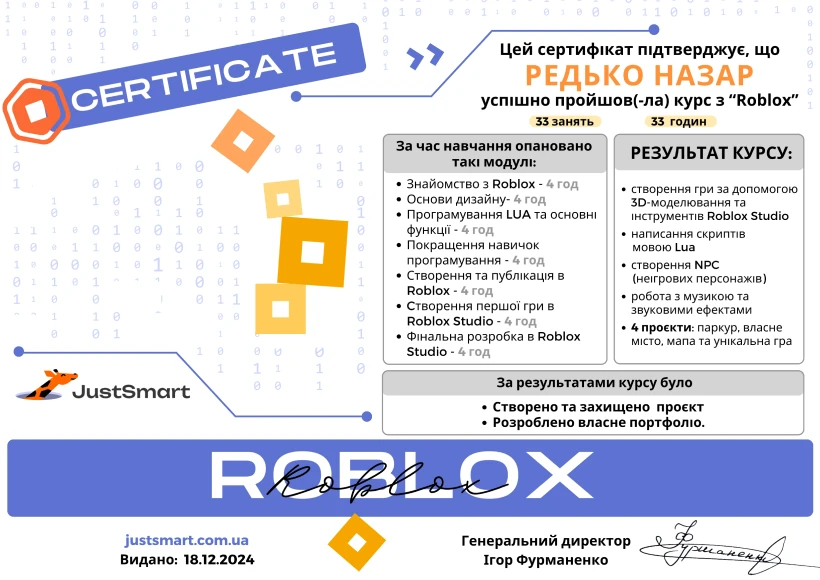
We issue a certificate after completing the course
What the child will be able to do after the course
Masters the basics of algorithmization and the Lua programming language.
Will create 3D models and master 3D space.
Learn to use the rules of composition and animation of characters and the game environment.
Create a game location according to the rules of level design and fill it with interactive elements.
Publish your own game and be able to not only play it with friends, but also monetize it!
Roblox Course Program for Kids
Module 1
Introduction to Game Design. Basics of Roblox Studio.
8 themes
List of topics you will learn:
Roblox Studio and its interface. Obby project.
Game development stages. Working with mind maps. Structure of a Roblox Studio project.
Toolbox tool. Adding objects to the map. Object properties. Project "Halloween".
Learning curve in games. Project "Lobby".
Show more topicsCollapse topics
Canva. Creating a game manual.
Adding custom assets to the game. Using rbxassetsid. Project "Lobby".
Game pacing. Level design for various tasks (search, combat, logic).
Project work.
Module 2
Terraforming Tools. Level Design.
6 themes
List of topics you will learn:
Landscape creation tools. Terrain Editor.
Landscape coverage. Materials and textures. Replacing default textures with custom ones.
Key concepts of Level Design with real-life examples. Designing your own supermarket.
Show more topicsCollapse topics
Level planning. Overall composition.
Level atmosphere. Working with lighting and sound effects.
Project work.
Module 3
Introduction to LUA Programming. Creating a Platformer Game.
10 themes
List of topics you will learn:
Creating a LocalScript. Using the Console tool.
Algorithm design. Creating flowcharts.
Variables. Data types in Lua.
Conditional statements. Program "Blacklist".
Functions. Creating and calling functions.
Show more topicsCollapse topics
Loops. Timer. Systematic object generation.
Interaction with environment objects.
Interaction between characters. Creating NPCs.
Creating lists. Implementing inventory.
Project work. Project "Super Mario".
Module 4
3D Modeling. Using Custom Models in Game Creation.
6 themes
List of topics you will learn:
Tinkercad service. Using primitive shapes to design a building facade. Align tool.
Adding holes. Hole tool.
Exterior and interior. Scribble tool.
Show more topicsCollapse topics
MagicaVoxel. Voxel modeling.
Exporting 3D models to Roblox Studio. Texturing them.
Project work. Creating a complete game scene using custom models.
Module 5
Creating Animation in Roblox.
8 themes
List of topics you will learn:
Animation Editor tool. Basic principles of animation development. Keyframes.
Script for playing animation. Weapon animation.
Creating custom character movement animations.
Face Animation.
Show more topicsCollapse topics
Camera animation. CutscenePlugin.
Live Animate Creator tool. Motion tracking via camera.
Combining animations.
Project work.
Module 6
Creating a Shooter Game with GUI Elements.
10 themes
List of topics you will learn:
GUI elements. Creating a frame and other UI components.
Properties of GUI elements.
Using UserInputService to show and hide GUI.
Creating health and ammo indicators.
Level design for the shooter game.
Show more topicsCollapse topics
Character interaction with objects. Implementing different weapons.
Vector3 data type. Random bonus generation on the map.
Target and enemy generation with AI.
Developing a personalized player card.
Project work. Creating level two.
Module 7
Video Blogging and Video Editing.
8 themes
List of topics you will learn:
Creating a storyboard. Using AI to generate a script.
OBS Studio as a tool for recording video. Setting up layout and hotkeys.
Audio effects in OBS Studio. Recording a let's play. Uploading to Google Drive.
ClipChamp. Basic video editing tools.
Show more topicsCollapse topics
Creating video intros and outros. Panzoid online service.
Shot composition rules. Basics of color theory and lighting.
Adding subtitles and other elements to the video.
Project work. Video on the topic "TOP 3 MODES IN Roblox".
Let's test the child's abilities and determine his level of knowledge
Let's help create his first miniproject
Let's choose the optimal lesson and study plan
Student results after a few months of learning
Ivan, 11 years old
I created my first game in Roblox and couldn't believe it actually worked!
Ivan, 11 years old
I created my first game in Roblox and couldn't believe it actually worked!
Maria, 10 years old
I love building my own worlds — in Roblox, you can bring any idea to life!
Kyryl, 13 years old
Now I don’t just play — I make games for others!
Alina, 11 years old
I’ve learned to code — it’s not nearly as hard as I thought!
Timur, 13 years old
My game has traps, bonuses, and even a secret level — I made it all myself!
About JustTech
JustSmart is an online school for children and teenagers, which is part of the JustTech product family.
428,500+ students are growing with us
16,500+ teachers choose our products
500+ employees in the team
7+ years on the market
4 educational products
A bit about teachers
JustSmart has over 50 teachers who help explain the basics of programming in a simple way and keep students engaged in learning.
In the Roblox course, our teachers use various digital tools so that students can express themselves in different areas:
Roblox Studio – for creating game worlds and simple scripts.
Clipchamp – for video editing and presenting your own projects.
Canva – for visualizing ideas, working with text, color, and graphics.

Rostyslav
Specialization: game creation in Roblox Studio, visual programming, game mechanics logic
Teaches students to:
Create their own 3D worlds in Roblox
Configure objects, characters, and cameras
Build simple interactions without complex code
5
yearsTeaching experience
Stanislav
Specialization: Roblox Studio, Lua basics, interactive game creation
Teaches students to:
Write their first lines of code in Lua
Add scripts for interactions and animations in games
Work with objects and events in the game environment
5
yearsTeaching experience
Viktoriia
Specialization: game design in Roblox, story scripting, game logic
Teaches students to:
Create games with their own stories and rules
Design levels and gameplay
Use Roblox tools for teamwork
6
yearsTeaching experience
Dmytro
Specialization: modeling in Roblox, integration of design and programming
Teaches students to:
Create unique locations and models
Combine visual style with functionality
Make games engaging through balanced design and mechanics
4
yearsTeaching experience
What parents and students write about our course
Very satisfied with your school. My daughter is programming at JustSmart. She really likes the Roblox course:) I recommend it to everyone!!!!! Great approach to children and an interesting teaching system:) I recommend it!! !!!
Polina Bulka
December 20 (Facebook)
I was looking for a programming school for my son and I did not regret choosing JustSmart. My son likes it, after each class he tells me what he learned, shows his developments in Roblox. I can see that the child is interested. Thanks to JustSmart School!
Alyona Aleksandrova
December 21 (Facebook)
My son has been studying at the JustSmart online school for six months. We chose programming (Roblox), because modern technologies require a lot of knowledge, and the classes at the JustSmart school are very interesting, the teachers are well versed in the methodology and they know how to clearly present the material to students. My son always looks forward to classes). And there is also a flexible payment system, which is very convenient! I recommend it!!!
Olya Trinoga
July 29 (Facebook)
The best encouragement for my son is the next roblox programming lesson. It improves his mood, and communication with like-minded people, and skills for a great profession. Special thanks to the teacher Dmitry!
Maria Perchenko
December 20 (Facebook)
For half a year now, my son has been programming from Roblox Studio and he does it with pleasure. ordinary computer games have turned into a useful hobby. I recommend JustSmart 😊
Serhiy Ponomarenko
December 20 (Facebook)
Very satisfied with your school. My daughter is programming at JustSmart. She really likes the Roblox course:) I recommend it to everyone!!!!! Great approach to children and an interesting teaching system:) I recommend it!! !!!
Polina Bulka
December 20 (Facebook)
I was looking for a programming school for my son and I did not regret choosing JustSmart. My son likes it, after each class he tells me what he learned, shows his developments in Roblox. I can see that the child is interested. Thanks to JustSmart School!
Alyona Aleksandrova
December 21 (Facebook)
My son has been studying at the JustSmart online school for six months. We chose programming (Roblox), because modern technologies require a lot of knowledge, and the classes at the JustSmart school are very interesting, the teachers are well versed in the methodology and they know how to clearly present the material to students. My son always looks forward to classes). And there is also a flexible payment system, which is very convenient! I recommend it!!!
Olya Trinoga
July 29 (Facebook)
The best encouragement for my son is the next roblox programming lesson. It improves his mood, and communication with like-minded people, and skills for a great profession. Special thanks to the teacher Dmitry!
Maria Perchenko
December 20 (Facebook)
For half a year now, my son has been programming from Roblox Studio and he does it with pleasure. ordinary computer games have turned into a useful hobby. I recommend JustSmart 😊
Serhiy Ponomarenko
December 20 (Facebook)
Very satisfied with your school. My daughter is programming at JustSmart. She really likes the Roblox course:) I recommend it to everyone!!!!! Great approach to children and an interesting teaching system:) I recommend it!! !!!
Polina Bulka
December 20 (Facebook)
Frequently asked questions
What is Roblox?
Roblox is an interactive platform for playing and developing your own games, where users can create and share their own virtual worlds using the unique Lua programming language. This platform not only allows you to enjoy games, but and use creativity for exciting gaming experiences. Roblox programming courses for kids online are the first step to serious, adult programming and a successful programming career.
How do kids learn programming in Roblox?
Kids learn Roblox programming by creating their own games. They work with 3D objects, assign behaviors using the simple Lua language, and immediately see the results. This way, they grasp coding basics, event logic, variables, and loops in a game-like format. We start with a trial lesson and then select the perfect group based on age and schedule.
What equipment is needed for the lessons?
To study effectively in the online Roblox course for kids, a computer or laptop, a stable internet connection, and a headset are required.
Is any prior knowledge required before the course?
The course is suitable both for those who have never tried programming and for those who already have experience with Roblox Studio. Its adaptive format allows returning students to improve their level by completing more complex tasks and solving new challenges in the most efficient way.
What if my child misses a class?
Don't worry: all recordings and materials are available on our platform. If your child misses a few lessons, they can catch up independently. If they miss more, we can transfer them to a group that's covering the same topics. Our goal is to ensure maximum flexibility and comfort in your child’s learning.
What if my child doesn't enjoy the course?
Our classes are never boring because Roblox is an exciting process where every child instantly sees the result of their creativity. Our teachers use unique methods that encourage and support children's interest. They create a positive environment where each student feels supported, grows, and enjoys learning programming. If your child doesn’t enjoy Roblox, they can choose another one of our coding courses for kids.
Sign up for a free trial lesson
Make sure the Roblox course interests your child!
Format: Online lesson with a methodologist on our platform
Lesson duration: 60 minutes
What your child will experience during the lesson: